My Budget Homelab: Self-Hosting with Debian, ZFS, and Docker
Table of Contents
A continuously evolving overview of what I selfhost in my homelab. Because I value my own digital sovereignty and privacy I focus on applications which remove dependence on Big Tech. I control my own images using Immich (a great first step to de-Google) and my documents using Paperless-ngx. These and more applications all run on one Debian 13 server which uses ZFS and Docker. My goal is to provide a highly reliable system with low maintenance, not to reinvent the wheel.
Pontus: My budget Lenovo Thinkstation server
A few years ago, I’ve bought a used Lenovo Thinkcentre for just 80€. It was build in 2016. Since then, I replaced the internal SSD and added two 2 TB hard drives for storage. Furthermore, the 16 GB DDR4 RAM from my main PC got a second life in the server after I upgraded my PC to 32 GB. The exact specs are:
- CPU: Intel Core i5-6400
- RAM: 16 GB DDR4
- Internal storage: 125 GB SSD for the operating system
- Data storage: 2 times 2 TB HDD, one for production and one for backups
- Operating System: Debian 13
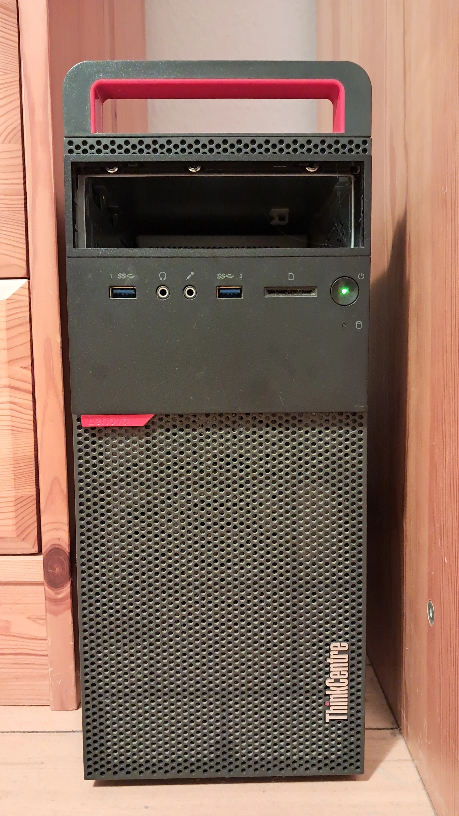
As a small office workstation, the Thinkcentre is truly low-powered. Even with 2 spinning harddrives, the idle power consumption is just 24 Watts. Energy costs in my homelab are an important factor, because electricity prices in Germany are pretty high. I will not spin down my harddrives to save a few more Watts, as I believe that the additional wear and tear is too high to make it economically viable. Especially with the current (August 2026) harddrive prices.
ZFS on Linux for reliable data storage
ZFS is the gold-standard for filesystems. It features advanced data protection, high performance and a great support for snapshots, which I make great use of in my backups. The reasons why I decided to deploy ZFS are two-fold: First, I need reliable and performant storage. I selfhost not only for myself, but also for my family, which makes me responsible to not lose their precious images. Second, ZFS is widely used in the enterprise. By learning to work with it in my homelab, I already have relevant skills for potential jobs in my future career.
Since the license of ZFS is incompatible with the Linux kernel, distributions usually do not ship it out of the box. The OpenZFS project develops OpenZFS on Linux which can install OpenZFS as out-of-tree module using DKMS. It is only recommended to do so on stable operating systems with less frequent releases, as OpenZFS on Linux and the kernel are developed separately. This might induce compatibility issues on frequently updated kernels. Additionally, ZFS must be installed after the operating system, increasing the workload slightly when provisioning a new system.
Docker to run my homelab services
I containerize all my workloads using Docker. It is reliable and proven. Furthermore, Docker is the standard method of deployment in homelabs, meaning almost all software I would like to host is available as a container image. I use docker-compose to declaratively manage my containers.
The software in my homelab
A homelab is only as good as the software deployed in it. I am on a quest to replace as many as big-tech services as possible with self-hosted alternatives, starting with the ones that keep the most amount of private data. To improve user experience, I have the requirement that all services support Single-Sign-On (SSO). SSO allows all users to login with a device once and be authenticated with all services right away. Furthermore, I want my configuration to be as declarative as possible. In case of system failure, bringing my services online again quickly and with the same capabilities my users (read: my family) is used to is important to me.
Authelia afor Single Sign On (SSO)
To implement SSO using OpenID Connect (OIDC) I use Authelia. It is a lightweight alternative to Authentik. In contrast to the later, Authelia has no management UI. User management is done using a YAML file, again fulfilling my requirement of a declarative configuration. Authelia is a certified OIDC 1.0 provider compatible to all services which support OIDC.
Traefik reverse proxy
My only server runs all services. Thus, a reverse proxy is a fundamental requirement. Many good ones exist. At work, I have been working with both Nginx and Apache httpd. For my homelab however, Traefik has proven to be a solid choice. It supports auto-renewal of SSL certificates. Furthermore, attaching a few labels on each docker service are enough to configure routing for this service through Traefik. This makes it incredibly easy to add a new service. Since the Traefik configuration lives right in my Docker compose, it is one file less to worry about if I have to rebuild my homelab.
Tailscale as mesh VPN
The homelab needs to be available from anywhere on earth, but for security reasons, I do not want to expose any port to the outside world. Tailscale is a modern mesh VPN connecting devices through firewalls and NATs. I run Tailscale directly on the host. This way, Pontus is added as a node to tailscale, and all services are automatically available to all devices in my tailnet. As a downside, this removes the ability to do access control for specific services on a network level. Fine-grained access control like this is not a major concern for me, because only my family has access anyway, and they can use all services they want anyway.
Unfortunately, Tailscale is proprietary, which is something I dislike. They at least have metadata access to which device is connecting with which other devices. For the future, I am looking to replace Tailscale with a selfhosted option like Nebula.
Immich to replace Google Photos
Immich is the corner piece of my homelab and the first I deployed after getting the initial building blocks going. And let me tell you, it is awesome. My family loves it, and so do I. We all backup our images to it. Having image hosting under your control is one of the most important steps to de-Google, and thanks to Immich it is super easy. Previously, I would move the images from my phone to my PC and an external hard drive every now and then, while the rest of my family would back up their images to Google. Since deploying Immich, I can access all my images at any time through the app on my phone or the browser. Furthermore, Immich offers face recognition so I can quickly search for specific people, but also object recognition, OCR and location tagging. All locally on my old server. I am surprised how well the server handles the AI workloads required the advanced search features.
Paperless-ngx for document management
I also deploy Paperless-ngx for document management. I honestly expected to get more use out of it, but it is not yet set up perfectly, so usage might increase once I smoothed all the rough edges. Getting OIDC to work has been challenging for example. Although I got it working in the browser, the Paperless mobile app is still unable to login. I would love to get it to work. Quickly taking pictures of a new document and have it uploaded to Paperless-ngx would greatly increase UX.
Beszel as docker-native monitoring solution
Beszel is a beautiful and capable monitoring tool with native docker support. Beszel itself is deployed using docker images. Currently, my main concern is the health of my two harddrives. Me and my family can tolerate an outage in one service, and the load we generate is by far not enough to overload the server. But what I can not tolerate is a faulty harddrive, as that leads to data loss rather quickly. Docker allows me to pass my harddrives through to the container, where Beszel recognizes them and constantly monitors their SMART data.
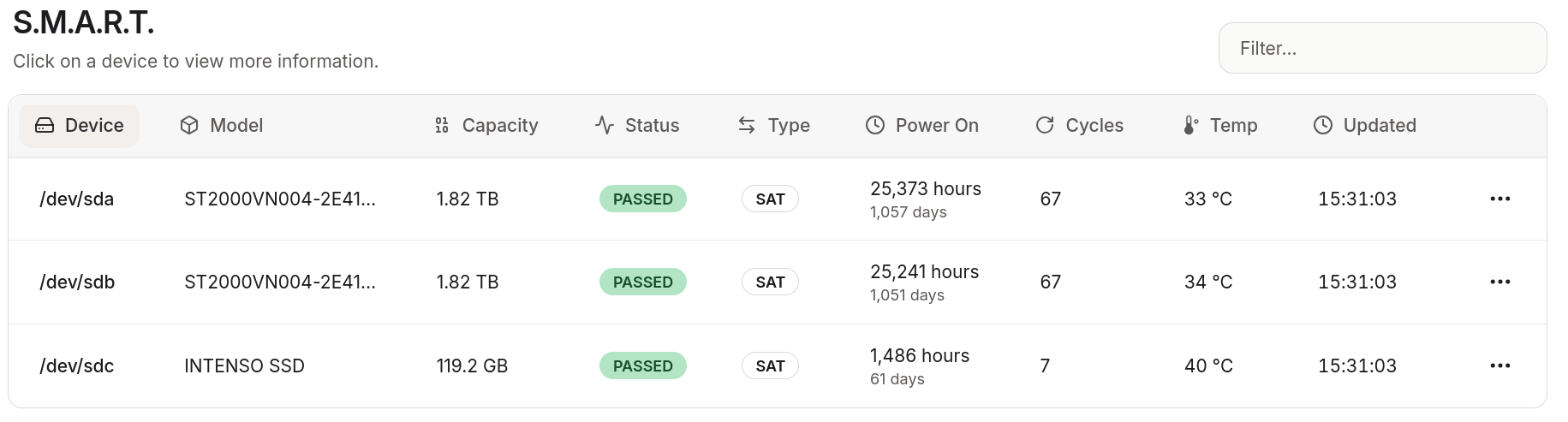
It is not as detailed as Prometheus + Grafana (which I know from work) but I do not need it to be for my homelab. What I need is a quick and reliable solution. That’s what Beszel is.
My data-safety strategy
I have mentioned the importance of data safety multiple times in this blogpost. Since I am on a budget, I do not own a secondary backup server, or offsite backup. I am planning to improve my backup-strategy in the near future though. Currently, I simply use two ZFS pools with one harddrive each:
data-poolfor use in production. Contains all Docker volumes.backup-poolfor backups. Every night, a script performs an incremental ZFS snapshot ofdata-pooland sends it tobackup-pool.
If the nightly backup fails, I’m notified via ntfy.
This setup is far from perfect. It is only one replica, which resides on the same system. Should something happen to that system, chances are good both drives will be damaged. That is far from the famous 3-2-1 backup strategy. I have 2 copies, in 1 location, and no copy is using another software stack. This is why I currently recommend my family to store additionally their images on their laptop. Needless to say, improving data safety is at the top of my priorities at the moment.
Media: A DIY TV Set Top Box for my parents
My parents still like to watch satellite TV. Commercial Set Top Boxes are expensive and full of proprietary software which I do not trust. When my parent’s old one died, I bought a used Minisforum Mini-PC and a TV Stick from Sundtek. It is connected to their TV (luckily too old to be a smart TV) via HDMI.
Media also runs on Debian 13. Upon boot, it automatically logs in and launches Kodi which my parents can control from their smartphones using Kore, the official Kodi app by the Kodi Foundation. In case my parents want to watch a streaming service, they can use the attached keyboard and mouse.
The Sundtek TV stick is plugged in via USB and receives the DVB-S signal from the satellite TV antenna. Sundtek offers an up-to-date driver for Linux which also installs a Systemd service to automatically start in the background.